30 posts tagged with "dust"

View All Tags

· 3 min read
Damian Tarnawsky

We're excited to announce a new feature for burn organizers: automatic content moderation. Dust can now scan camps, art, and events for potentially problematic content, helping you maintain a safe and welcoming environment for your community.

Why Moderation?

As your burn grows, manually reviewing every camp description, art piece, and event submission becomes increasingly difficult. With moderation enabled, Dust automatically scans content as it's submitted or changed, flagging anything that might need your attention.

What Gets Scanned?

Moderation reviews text content across:

  • Theme Camps - Names and descriptions
  • Art - Names and descriptions
  • Events - Titles and descriptions

Moderation Styles

You have full control over how moderation works for your burn. Choose from three options:

  • No moderation - Content is not scanned. You manually review everything.
  • Flag - Problematic content is flagged for your review, but remains visible in the dust app.
  • Flag and Hide - Problematic content is automatically hidden until you review it.

The "Flag" option is great if you want visibility into potential issues without censoring any content. "Flag and Hide" provides more protection by keeping questionable content out of the app until you've approved it.

Automatic Publishing

If you choose the Flag and Hide then content that is not flagged will be published automatically (done every 24 hours). Any content that is flagged will be hidden from the dust app. Additionally if you unapprove a camp or art piece it will also be hidden when published.

What Does It Detect?

Dust uses AI-powered moderation designed to detect:

  • Sexual content
  • Hate speech
  • Harassment
  • Self-harm content
  • Graphic violence
  • Threats and hostile language

Getting Started

  1. Go to Settings in your burn
  2. Find the Moderation option
  3. Choose your preferred moderation style
  4. Click Publish

That's it! From then on, all new and updated content will be automatically scanned. Any flagged content will also trigger an email to admins.

Review Flagged Content

When content is flagged, you'll see it marked in the Camps, Art, or Events list. You can then review the content and decide whether to edit it, or remove it. After saving a change to flagged content you will get a popup notifying you if the content is still flagged or not.

Flagged Content

For more details, check out the Moderation documentation.

We hope this feature helps you build a safer, more inclusive burn. As always, let us know what you think!

· 2 min read
Damian Tarnawsky

We've made significant improvements to how you import data into Dust. Whether you're bringing in theme camp and art data from spreadsheets or syncing locations from Google Maps, the new import tools give you better visibility and control.

CSV Import Preview

The CSV import for theme camps and art now shows a detailed preview before you commit to changes. Items are grouped into three categories:

  • New: Items that will be created
  • Updated: Existing items with changed fields (shows exactly which fields changed)
  • Existing: Items with no changes

This makes it easy to verify your import before applying it, and helps catch issues like duplicate entries or unexpected changes.

KML Import Preview

The KML import has been completely redesigned with a comprehensive preview system. When you import a KML file from Google Maps, you'll see:

  • Location Changes: Camps or art with updated coordinates
  • No Changes: Items where coordinates already matching what is in dust
  • New or Mismatching Items: Placemarks that don't match existing records (eg Theme Camps that are not in dust yet, or whose names don't quite match)
  • Items Not in File: Existing camps/art that are missing from the KML file
  • Restrooms and Other Placemarks: Special pins like restrooms and shuttle stops

The preview helps you identify naming mismatches between Google Maps and Dust, so you can fix them before importing.

Better Error Handling

Both import tools now provide clear error messages when something goes wrong:

  • File validation errors (empty files, invalid format)
  • Coordinate parsing issues

You'll know exactly what needs to be fixed before you can proceed.

Smart Matching

The import system uses intelligent matching to connect your data:

  • External IDs: Match by unique identifier for reliable updates
  • Name matching: Case-insensitive with fuzzy matching for minor variations
  • Handles variations: Ignores "Camp" prefixes, emojis, and special characters

Getting Started

Import options are available from the menu on the Camps and Art pages. For detailed instructions, check out the Art, Camps or Google Maps Import documentation.

We hope these improvements make managing your burn's data easier. Let us know what you think!

· 2 min read
Damian Tarnawsky

We're excited to announce a new feature that makes collecting information from theme camp and art leads much easier: Questions. This built-in system replaces the need for external Google Forms and streamlines your registration workflow.

What Are Questions?

Questions are custom fields you can add to camp and art registration forms. They let you collect specific information you need from organizers during the registration process—all within Dust, without requiring separate forms or manual data consolidation. Answers to questions are private between you and the artist/theme camp.

For example, you might want to know:

  • Camp size and land requirements
  • Art installation dimensions and safety considerations
  • Power and equipment needs
  • Accessibility accommodations
  • Ticket grant requirements

Why We Built This

Many burn organizers have been using Google Forms alongside Dust to collect additional information. While this works, it creates friction: organizers need to do extra setup for form filling, data gets scattered across different systems, and its hard to manually sync responses between platforms.

Questions solves this by keeping everything in one place.

Getting Started

To start using Questions:

  1. Log in to the admin portal at edit.dust.events
  2. Navigate to Settings (gear icon)
  3. Click the Questions tab
  4. Add questions for theme camps and/or art installations
  5. Set questions as required or optional
  6. Add helper text to guide organizers

Questions you create will automatically appear in the registration forms for camps and art. Responses are kept private between you and the organizer.

Here's an example of additional questions that were added as part of the art registration: questions

Learn More

For detailed documentation on creating and managing questions, check out the Questions documentation.

We hope this feature makes managing your burn's registration process smoother. As always, we'd love to hear your feedback!

· 3 min read
Damian Tarnawsky

November brings some quality of life improvements to the dust app that make it easier to find music events and keep your map up to date. We've also got some updates for regional organizers to improve the placement experience and overall performance of dust.

Music Tab "All"

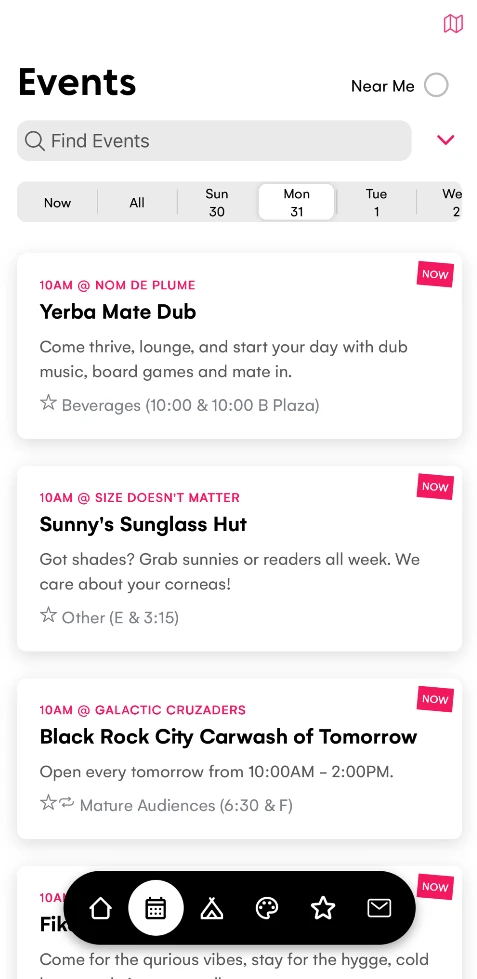
The music tab now includes an "All" option that lets you search and view events across all days. Previously you had to swipe through each day to find events, but now you can see everything in one place. This is particularly useful when you're looking for a specific artist or event but aren't sure which day they're performing, which was feedback from this years Burn and our integration with Rock Star Librarian.

Map Updates on Resume

When you resume the dust app after switching to another app or unlocking your phone, the map will now automatically update. This ensures you're always seeing the most current information about events and locations without having to manually refresh.

Geolocation Updates

Similarly, your geolocation on the map will now update when you resume the app. This means your position marker will be accurate even if you've moved around while the app was in the background, helping you navigate the playa more effectively.

Diacritic Search Support

Search has been improved to find words with diacritics. For example, searching for "Crepe" will now properly find "Crêpe" and other similar matches. This makes it easier to find camps and events regardless of how you type the search term.

Theme Customization

Burns can now customize the primary color of the dust app to match their branding. This allows each regional burn to have a unique look and feel that doesn't clash with dust's pink/red color.

Map Placement Improvements

You can now easily move camps and art on the map. Go to any camp or art and click Place then you can click any camp or art and then click where you want it to be moved to. Click Save when you are done.

New Database!

We recently migrated our database infrastructure from Cloudflare D1 to Turso. For you this will mean administering your regional burn will feel snappier!

For the technically minded, we made the choice to switch to Turso because it allows us to have sycing replicas: allowing much faster access because of replicas of the database hosted around the world. We are still keeping the rest of our infrastructure in Cloudflare, the decision was made because we were not confident in Cloudflare D1's beta implementation of read replicas.

· One min read
Damian Tarnawsky

cake Dust is celebrating it's 2nd birthday!
Dust began as a gift for Burning Man 2023 and added its first regional burn SNRG in October 2023. Since then we've added regional burns along the way and for 2025:

  • 40 regional burns have used dust!
  • 1922 theme camps
  • 7299 events
  • 1320 art pieces
  • 114 mutant vehicles
  • 1422 music events

By comparison Burning Man 2025 has 1391 theme camps, 4404 events, 317 art pieces.

· 3 min read
Damian Tarnawsky

We've just released a new feature for camps: accepting events from the public!

This means that for Center Camp or camps with a stage a camp lead or organizer can accept events. This had previously been a manual process for the camp lead to handle but now dust can manage this for you.

How does it work?

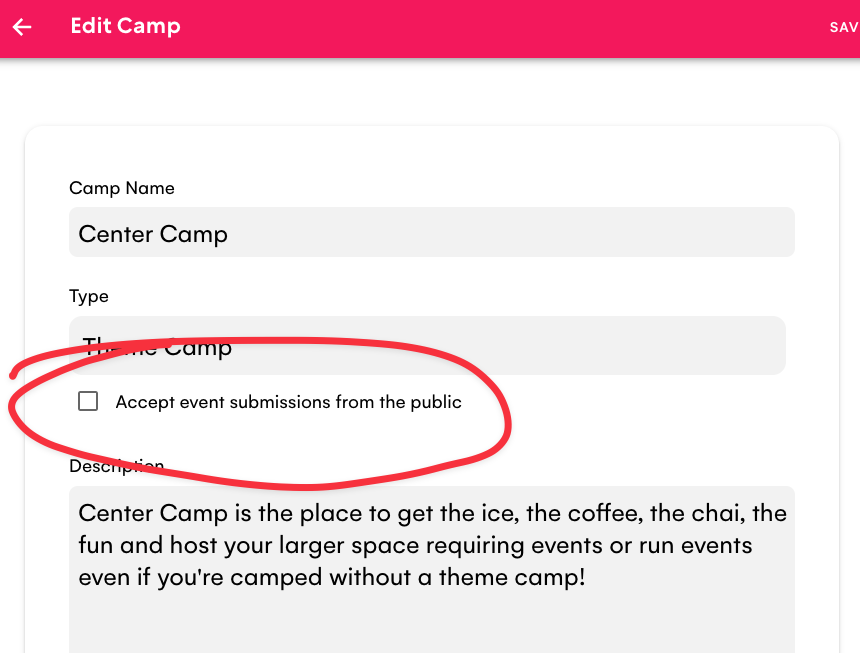
After saving your camp information and editing your camp you'll see a new checkbox marked "Accept event submissions from the public". If you check this option and click Save and Publish it unlocks event submissions.

tip

Don't forget to click Publish to save this change to the camp.

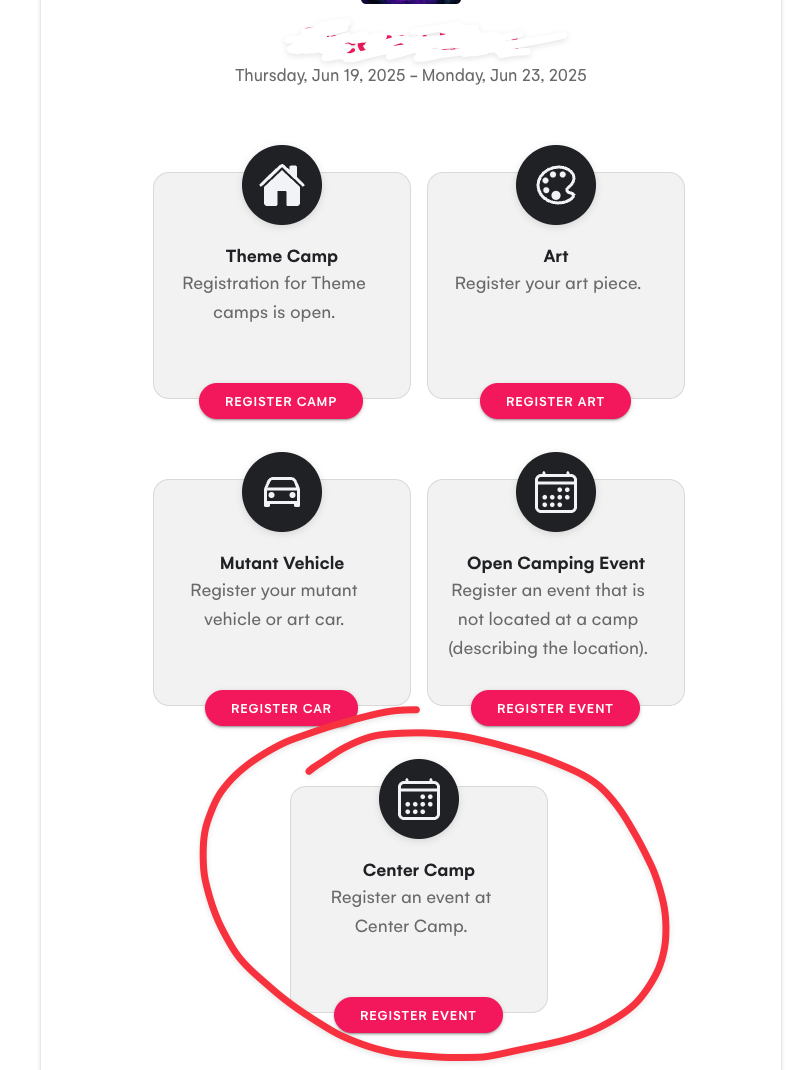
Accept Events

Now when someone wants to submit an event and visit your burn (ie via https://yourburn.dust.events) they will see this:

Register Event

Notice the registration option for "Center Camp"? For any camps that have open registration of events turned on this is available.

Best of all, when someone registers an event at that camp the camp owner(s) will be emailed - so they can follow up if there is any scheduling issues etc.

Multi Day Imports

Another new feature that has been recently added is the ability to import events from CSV that have multiple days. Previously you could have only one date in the Date field (eg Wednesday, April 24). Now you can list multiple days like "Wednesday, April 24, Thursday, April 25, Saturday April 27th" and date will understand that the event re-ocurrs on those dates.

Events using dust in May

To The Moon To The Moon, Jamestown, Tennessee - Thursday, May 29, 2025 - Sunday, Jun 1, 2025
Burning Nest Burning Nest, Devon, United Kingdom - Monday, May 26, 2025 - Monday, Jun 2, 2025
SOAK SOAK, Tygh Valley, Oregon - Thursday, May 22, 2025 - Monday, May 26, 2025

Playa del Fuego Playa del Fuego, Tamaqua, Pennsylvania - Thursday, May 22, 2025 - Monday, May 26, 2025
XMas Tree Burn XMas Tree Burn, Seaman, Ohio - Thursday, May 8, 2025 - Sunday, May 11, 2025
Bequinox Bequinox, Seraphim Ranch, California - Wednesday, May 7, 2025 - Sunday, May 11, 2025
Interfuse Interfuse, Pulaski Co, Missouri - Thursday, May 15, 2025 - Sunday, May 18, 2025
SideBurn SideBurn - Stone Mills, Ontario Canada - Thursday, May 15, 2025 - Monday, May 19, 2025
unSCruz unSCruz, Tres Pinos, California - Thursday, May 1, 2025 - Sunday, May 4, 2025

· 6 min read
Damian Tarnawsky

The last few months we've been heads down implementing so many awesome features in dust that we had to record a new series of tutorial videos!

If you are short on time here is the TLDR of whats new:

  1. Registration Improvements - Theme Camps, Art and Mutant Vehicle registration gets a much easier flow. You now only need 1 link on your website which allows participants to manage every aspect of the camp, art or mutant vehicle.
  2. Placement Forms - We've incorporated the forms (like Google Forms, Survey Monkey etc) into the registration process. This means you no longer have to keep this in sync with dust by importing.
  3. Management in the App - The management app of dust is now available inside dust!
  4. Volunteeripate - A new integration with Volunteeripate means that volunteers can get reminder notifications of their shifts.
  5. Offline Improvements - We've improved the experience when you have really bad cell service.
  6. Communication - More options for integrating messages like Newsletters, BlueSky and Mastodon.
  7. Tutorials Videos - We've recorded a series of bite sized videos for burn organizers.

Registration Improvements

We've created a single link for each burn that handles everything that participants need for theme camps, art, and mutant vehicles. As an example take a look at bequinox-2025.dust.events:

Registration Page

After login you get a home page that is tailored to the participant of your burn:

  • Camp/Art/Mutant Vehicle/Event registration options if they are new (with a follow up placement questionaire).
  • or a page to manage their camp etc if they had registered before.
  • or access to all features if they are an admin.

We've also made it easier for you to turn on and off registration in the Settings page:

Settings Page

Placement Forms

Your placement questionaire form for camps, art and mutant vehicles are now part of the registration flow in dust. This means that instead of putting links for these on your website you can add them to dust and they become part of how someone registers a camp, art piece or art car. They receive an email as a reminder to complete the form and are given the opportunity to complete it as they fill in details in dust.

You can turn the feature on by pasting the links to your forms in Settings > Placement: Placement Settings

Here's an example of the follow up email they receive to request completion of forms: Placement Questionaire

The benefit to you is a streamlined process that captures all the right information without having to manually import files last minute. You can also accomodate camps that don't need placement and you also get a heads up on which camps may be coming to your burn before they complete their placement questionaire.

Management in the App

You can now manage your burn inside the dust app. This works for all participants including regional organizers. You'll see a new "Participate" section on the home page of your burn:

Participate on the Home Page

Coupled with the improvements to the registration and placement forms it should make it much easier for everyone to make last minute changes to events etc, and because it is part of the app it should be quicker than visiting the dust website.

Volunteeripate

Volunteeripate is a platform to coordinate volunteers (and purchase tickets). Burners can now get reminders of their volunteer shifts by clicking the "Sync with Volunteeripate" button in dust:

Sync with Volunteeripate

For more information on how to integrate Volunteeripate please visit the docs.

Offline Improvements

At some burns like Love Burn in Miami and Element 11 in Utah there is cell service but it is really really bad. While dust will work offline there are still burners who open the app for the first time when they arrive at the burn.

The first time you open a burn in dust it will download all the camps, art etc. We can't make this part of the app because you need to be able to change this data and the review process for the app can be several days.

So, we've been working hard to make that first download experience much better on a bad cell network.

You may notice that there are some new download progress dialogs like this one in dust: Offline Download Screenshot

On a really bad cell network these:

  • Give an indication that something is happening even if it is slow
  • Will eventually time out if the network is too slow but will let you know this has happened
  • Will allow you to retry again in the case of a failure

The end result should be less frustrated burners who didn't open the app before they arrived at the burn. We can't make a bad cell network good but can give clear communication about the process.

Communication

We've added a new option for communicating with burners. This appears as a "Messages" tab in dust and can show Newsletters, Bluesky or Mastodon posts or an RSS Feed. We have a Video in our tutorials section on this. You can also contact us and we'll help you hook it up.

Tutorial Videos

We've added a dozen short form videos (~5 minutes) on different features in dust, including:

  • Setting up your Burn - Getting your burn into dust in 10 minutes.
  • Theme Camps - Theme camp management, importing and placement.
  • Art - Art and Mutant Vehicle management and importing.
  • Events - Managing events for camps, art and open camping events.
  • Map & Placement - Map images, Google Maps, placement and GPS accurancy.
  • Communication - Communicating to burners via notifications and messages.
  • Printing Event Guide - How to generate a printable event guide.
  • Forms - How to hook up Google Forms, Survey Monkey or others for registration and placement.
  • Links - Home page links for tickets, survival guide and more.
  • Volunteeripate - How to integration with Volunteeripate.
  • Last Minute Checklist - What not to forget before driving out the burn.

· One min read
Damian Tarnawsky

Burners love to know where mutant vehicles are located and now the dust app can show their live location on the map.

Mutant Vehicle owners can follow these directions to broadcast their location.

Mutant Vehicles that are broadcasting their location appear on the map as a yellow pin. If a mutant vehicle hasn't broadcast it's location in 24 hours then it will show at it's home base (where placement put it).

Live tracking of Mutant Vehicles is available for regional burns only (we'll work on a plan for Burning Man soon). It's only suitable to be used if you have cell service at your burn.

· One min read
Damian Tarnawsky

The event selection screen of dust has been given a revamp!

We've added the ability to list events vertically to quickly browse, and we've also added the region/state/country of the event. You'll also notice we no longer use the word "regional" to describe events as we're including community events like camp fundraisers, decompressions and "non-official" regionals.

Another revamp has been the search screen which now shows the distance and direction of camps, art and events and also shows the closest camp/art or event.

Dust screenshot showing event selection

· 2 min read
Damian Tarnawsky

We've been working on making registration of theme camps and event easier for everyone.

You'll notice a new button in the dust app Manage my camp & events which will let theme camp organizers (or any burner creating an event) to easily manage their camp, it's events and music. You can also use this as a way to manage the regional burn from your phone.

Dust screenshot showing manage my camp

The new button handles registration of new camps or editing a camp or burn. Once you have registered a camp the label will change to Manage [your-camp-name].

The new button appears when your burn has the setting Allow Camp Registration turned on in Settings and is hidden if you turn the setting off (You'll need to click Publish when you make a change).

Newsletter

We've recently started a newsletter for dust. If you are interested in finding out about new features and update you can sign up for the newsletter.

Volunteeripate

We've been chatting with Cabbie from Volunteeripate about a collaboration. If you haven't heard of Volunteeripate, it's a platform for volunteer management and ticket sales for regional burns. Details of the collaboration are still being worked out but we're excited at the opportunity to make it easier for burners to volunteer at a burn and easily access their tickets for gate checkin.